NEW QUESTION 114
You create a retention label policy named Contoso_Policy that contains the following labels:
* 10 years then delete
* 5 years then delete
* Do not retain
Contoso.Policy is applied to content in Microsoft SharePoint Online sites.
After a couple of days, you discover the following messages on the Properties page of the label policy:
* Status: Off (Error)
* It’s taking longer than expected to deploy the policy
You need to reinitiate the policy.
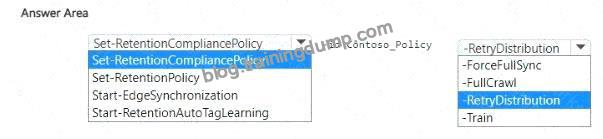
How should you complete the command? To answer, select the appropriate options in the answer area.
NOTE: Each correct selection is worth one point.
Explanation:

Step 1 – Review scenario
You created a retention label policy Contoso_Policy.
Status shows Off (Error) with message: “It’s taking longer than expected to deploy the policy.” Requirement: Reinitiate the policy.
Step 2 – Correct PowerShell cmdlet
To manage retention label policies in Microsoft Purview (compliance), the cmdlet is:
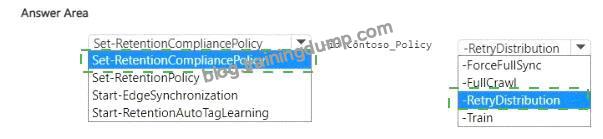
Set-RetentionCompliancePolicy
Other cmdlets:
Set-RetentionPolicy # Legacy Exchange Online retention policies, not Purview label policies.
Start-EdgeSynchronization # Sync for Edge Transport servers, not retention.
Start-RetentionAutoTagLearning # Used for auto-tagging learning, not relevant here.
Step 3 – Correct parameter
To force redistribution of a retention label policy when deployment fails, the parameter is:
-RetryDistribution
Other options:
-ForceFullSync and -FullCrawl # Apply to search/crawl, not retention.
-Train # Related to auto-tagging learning models, not retention.
Final Verified Answer
Set-RetentionCompliancePolicy -id Contoso_Policy -RetryDistribution
Reference:
Set-RetentionCompliancePolicy (Microsoft Purview PowerShell)


Leave a Reply